
Meeting - Video Meeting
Escape LabCommunication
4.247.00 Reviews
- Version
- 2.5
- Installs
- 1.00M
- Age Rating
- Everyone
Screenshots

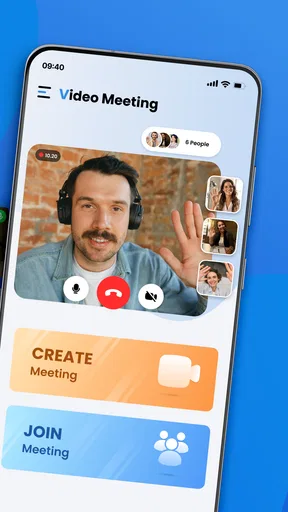

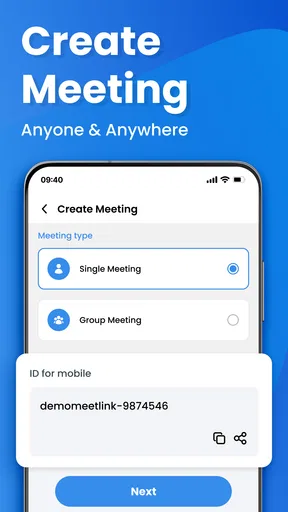
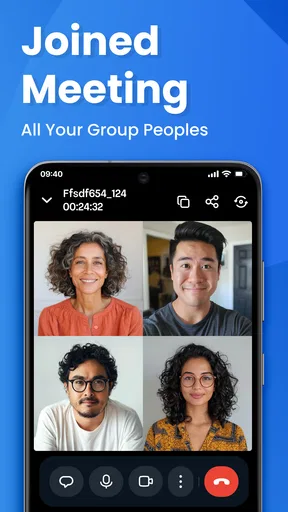



Our Review of Meeting - Video Meeting
 Analysis by Appyee
I tried Meeting - Video Meeting as a straightforward communication app for joining and hosting online conversations, and my first impression was that it aims to remove the usual barriers around video calls. It is free to use, is rated for Everyone, and comes from Escape Lab. That combination makes it easy to consider for casual calls, study groups, remote coordination, or a quick conversation with people who do not want to commit to a paid service.
The important distinction is that “free” describes the app’s listed price, not a promise that every possible service around online meetings will always be unlimited in every situation. I would approach it as a practical free option for video communication rather than automatically treating it as a full replacement for every established meeting platform. That is the mindset that gave me the fairest view of where it fits.
How Meeting - Video Meeting feels in everyday use
The app belongs to the communication category, and its short store description is simply “Meeting.” That minimal positioning is useful: this is not presented as a social network, a messaging suite, or a specialist business tool. Its purpose is centered on meeting online. If I only need to get people into a video conversation without adding a lot of unrelated features, that focused approach is appealing.
In a normal scenario, I would use it for a small family catch-up, a remote planning conversation, or a study session where the main requirement is seeing and speaking with other participants. The best workflow is to decide beforehand who needs to attend, make sure everyone has the app ready, and test the camera and microphone before the call begins. That small preparation matters more with any lesser-known meeting tool because the real cost of a free app is often the time spent troubleshooting at the start.
Meeting - Video Meeting is currently at version 2.5 and runs on Android 8.0 or later. That gives it a reasonably broad starting point for people using older Android phones, although compatibility alone does not guarantee an equally smooth experience on every device. A newer phone with a stable connection will usually be a safer choice for video calls than an older handset with limited battery life or a weak camera.
Escape Lab has positioned the app for general access rather than a narrow professional audience. Its Everyone age classification also makes it easier to consider for households and mixed-age groups. I would still encourage parents or organizers to supervise how younger users communicate online, because an age label does not replace sensible privacy habits.
What the free price really means
The listed price is free, which is the clearest value point here. I can try the app without making a purchase decision first, and someone arranging a one-off call does not have to justify a subscription just to speak with a group. For occasional communication, that can be more important than having an enormous feature list.
At the same time, I would not confuse free access with a guarantee that Meeting - Video Meeting has every advanced function found in paid workplace products. If your meetings depend on formal administration, detailed recording workflows, extensive collaboration tools, or organization-wide controls, the sensible comparison is not only the price. It is whether the app supports the complete process you need.
That is where the app’s value becomes situational. For a personal call, a volunteer group, or a lightweight meeting, paying nothing is a strong advantage. For a company that needs predictable governance and a carefully managed meeting environment, a paid alternative may still offer better value even when this app costs nothing, because failed meetings and confused participants have their own cost.
I also like that the app has already attracted a sizable audience: it has passed one million installs and holds an average rating of 4.2 from around thirteen thousand ratings. Those figures suggest that it is not an entirely unknown experiment. They should not be read as proof that it will suit every use case, but they do make trying it feel less risky than installing a tool with no visible adoption.
Where it can save time
The strongest practical benefit is the low commitment. If a friend suggests a video call, I do not need to buy a plan before finding out whether the app works for my group. If I am organizing a temporary project, I can test the meeting flow first and decide whether it is sufficient before asking everyone to change tools permanently.
Another useful angle is consistency. When a group settles on one meeting app, the biggest improvement is often not a special feature but avoiding a different setup for every call. Meeting - Video Meeting can serve as a single destination for people who want a dedicated video meeting app rather than switching between social apps, browser tools, and workplace platforms.
For a recurring study group, I would create a simple routine: send the meeting details early, ask participants to join a few minutes ahead of the discussion, and keep a backup text channel available for anyone who cannot connect. That workflow is not glamorous, but it prevents the app from becoming the only point of failure. It also makes the free option more useful because the group is managing the meeting intelligently instead of expecting the software to solve every problem.
A less obvious advantage is that a focused app can reduce distraction. If I open a broad collaboration platform, I may encounter chat spaces, files, calendars, notifications, and settings that are irrelevant to a quick conversation. A meeting-first tool can be easier for relatives or occasional participants who only need to understand one task: join the call and communicate.
Tradeoffs I would consider before relying on it
The first tradeoff is feature depth. The store summary emphasizes secure, fast, and unlimited video conferencing, but I would still test the exact meeting experience with the people who matter before using it for an important event. A short trial call can reveal more than a description: check how easily participants enter, whether the controls are understandable, and whether the audio remains usable when cameras are active.
The second tradeoff is familiarity. Many people already know the controls of major meeting services. With Meeting - Video Meeting, participants may need a little guidance if they have never used it. That is not a serious problem for a family call, but it can become friction when an organizer has to support a large group of first-time users.
The third is the difference between a casual meeting and a professional workflow. I would be cautious about choosing this app as the only tool for interviews, formal training, client presentations, or sensitive organizational work until I had personally checked the controls and reliability under those conditions. The app’s general communication focus is attractive, but a specialist business platform may be the better choice when records, administration, or structured collaboration are central.
Security also deserves a practical interpretation. The store summary presents the service as secure, which is reassuring, but I would still avoid sharing a meeting code publicly, keep invitations limited to the intended participants, and be careful about discussing confidential information in any consumer communication app. Good habits remain necessary regardless of the product’s security claims.
There is also a device tradeoff. Although Android 8.0 is supported, older phones may struggle more with heat, battery drain, camera quality, or multitasking during a call. If your phone is near the lower end of its capabilities, use a charger, close unnecessary apps, and connect through stable Wi-Fi when possible. Those steps improve the experience without pretending that software can overcome every hardware limitation.
Who will get the most value from it?
I think the best fit is someone who wants a free, uncomplicated way to arrange video conversations and does not need a deep business ecosystem. That includes families spread across different locations, students coordinating a discussion, hobby groups, community organizers, and small teams testing a meeting routine. The Everyone rating also makes it approachable for broad household use, provided adults set sensible boundaries for younger participants.
It may also suit people who are tired of paying for a service they use only occasionally. If your video meetings happen irregularly, the ability to try a free app can be more valuable than a long list of premium tools that you rarely touch. In that situation, I would judge it by three questions: can my group join without confusion, can we hear and see one another clearly, and does the call support the length and style of conversation we actually have?
The app is less convincing for users who need a complete work platform rather than a meeting room. If your day depends on shared documents, formal scheduling, detailed participant management, or a tightly controlled company environment, I would compare it with the workplace service your organization already supports. A free meeting app can still be useful as a backup, but it may not replace the surrounding tools.
I would also suggest skipping it if your group refuses to install new apps or strongly prefers browser-based access. The best communication tool is the one everyone can use at the right moment. If participants are uncomfortable with the setup, the theoretical savings disappear into delays and support messages. In that case, a familiar alternative may be worth choosing even if its free plan is more limited.
How it compares with familiar alternatives
Compared with a general messaging app, Meeting - Video Meeting has a clearer meeting identity. A messaging service may be better for ongoing text conversations, sharing everyday updates, or keeping a group history. This app makes more sense when the central activity is a live video conversation and you do not want the meeting buried inside a larger social or chat environment.
Compared with established workplace meeting platforms, its appeal is simplicity and free entry. The larger services often have stronger recognition, more familiar controls, and broader supporting tools. That can matter when you are coordinating many people or working inside a company. Meeting - Video Meeting becomes more attractive when the meeting itself is the priority and your group does not need a large administrative structure around it.
Compared with a phone call, video adds useful context but also demands more from the connection, battery, and device. I would choose this app when seeing faces or demonstrating something on camera improves the conversation. I would choose a regular call when the connection is unreliable, the discussion is private, or participants are in places where video is inconvenient.
That comparison leads to a practical recommendation: do not ask whether this is universally better than every alternative. Ask whether your next meeting needs a free dedicated video option or a broader communication ecosystem. The answer changes from one group to another, and the app’s value is strongest when its focused purpose matches the situation.
Small habits that make the experience better
Before inviting a group, I would run a private test with one other person. Use it to check the camera angle, microphone clarity, speaker volume, and the way you enter or leave the meeting. This is especially helpful when inviting older relatives or participants who are not comfortable with unfamiliar apps.
I would also send a short preparation note rather than only the meeting invitation. Tell people whether they should use headphones, join from a quiet room, and keep the app updated. Since the current version is 2.5, checking that participants are not using an unusually old installation is a sensible troubleshooting step.
For a study or planning session, assign one person to keep track of the agenda outside the call. A simple note on paper or in another app prevents the meeting from depending on features that may not be central to this product. This is one of the best ways to use a focused meeting tool: let it handle the conversation while another lightweight method handles the structure.
Finally, keep a fallback plan. A phone number, text conversation, or rescheduled time can rescue the group if someone loses connectivity. I do not see that as a criticism unique to this app; it is a sensible rule for any online meeting. Still, free tools are most satisfying when you use them with realistic expectations rather than treating them as guaranteed infrastructure.
My recommendation after weighing the value
Meeting - Video Meeting is worth trying if you want a free communication app centered on video meetings and your needs are straightforward. The combination of free access, broad Android compatibility from version 8.0 onward, an Everyone rating, and visible adoption gives it a credible place on a shortlist. I appreciate that I can evaluate it with my own group before spending money or committing to a long-term plan.
My recommendation is more cautious for professional or high-stakes use. I would not select it solely because the price is free, and I would not assume that a general meeting app can replace a mature workplace platform. Test a real call, include the least technical participant, and see whether the controls and reliability match your routine. If they do, the savings are genuine. If they do not, a paid or more established alternative may deliver better overall value despite its cost.
Overall, I see this as a sensible option for personal calls, small groups, and lightweight coordination. It is not the right answer for everyone, but it does not need to be. The best reason to choose Meeting - Video Meeting is its low-risk way to try dedicated video communication before paying or making a larger commitment. For readers in that situation, I would install it, run a test meeting, and keep it if it makes joining and talking easier for the people you actually need to reach.
With an average rating of 4.2 and around thirteen thousand ratings, it has enough public response to justify a closer look, while its more than one million installs show that other users have already adopted it. The app is free, developed by Escape Lab, and released on January 31, 2025. Those details do not decide the experience by themselves, but together they support my final view: try it for ordinary video meetings, judge it with your own group, and skip it when your needs clearly extend beyond a focused communication tool.
Verdict
Strengths of Meeting - Video Meeting
- Simple interface makes joining meetings quick for new users.
- Supports video calls with multiple participants at the same time.
- Useful chat feature for sharing short messages during meetings.
- Meeting links make it easy to invite people without complex setup.
- Works well for remote classes, interviews, and team discussions.
Limitations of Meeting - Video Meeting
- Video quality can drop noticeably on slower or unstable connections.
- Some advanced collaboration tools may require a paid plan.
- Background noise can be distracting without headphones or mute control.
- Long meetings may consume considerable battery and mobile data.
- Privacy details may not be clear to users before joining a meeting.
Similar Picks in This Category
View All
Google Messages
Google LLC4.6

Gmail
Google LLC4.1

Google Meet
Google LLC4.4

Google Chrome
Google LLC4.1

WhatsApp Messenger
WhatsApp LLC4.6

Carrier Services
Google LLC4.2
Frequently Asked Questions
What is Meeting - Video Meeting used for?
Meeting - Video Meeting is designed for online communication through video calls, voice conversations, and text-based meeting features. After installing it, users can generally join scheduled sessions, communicate with several participants, and use their device camera and microphone for a more personal meeting experience. It can be useful for remote work, online classes, group discussions, family calls, or casual conversations, depending on the features available in your version of the app.
Do I need to create an account to join a video meeting?
The sign-in requirements may depend on how the meeting was created and the app’s current configuration. In many cases, participants can join through an invitation or meeting link, while hosts may need to register before creating and managing meetings. Before downloading, check the app’s login options and permissions. If you prefer not to create an account, confirm whether guest access is supported for the meetings you plan to attend.
Can Meeting - Video Meeting be used on both Android and iPhone?
Meeting - Video Meeting may be available for mobile devices running Android and iOS, but compatibility can vary according to the app version, operating system, and device model. We recommend downloading it only from the official Google Play Store or Apple App Store and checking the listed requirements first. Older phones may install the app but provide a less comfortable experience, especially during video calls or when several people are connected.
What permissions does the app require for video meetings?
To provide its main communication features, Meeting - Video Meeting will normally request access to your device’s camera and microphone. It may also ask for notifications, contacts, storage, or network-related permissions, depending on the functions you use. You can review and change these permissions in your phone’s settings. For privacy, allow only the access that is necessary, and disable the camera or microphone whenever you are not participating in a meeting.
Does Meeting - Video Meeting require a strong internet connection?
Yes, a stable internet connection is important for a smooth experience. Video meetings use considerably more data than audio calls, and weak Wi-Fi or mobile coverage can cause delays, frozen video, dropped calls, or reduced picture quality. Before joining an important meeting, test your connection, close unnecessary downloads, and consider turning off your camera if the call becomes unstable. Mobile data usage may also be significant during longer video sessions.
